
No products in the cart.
Return To Shop


Orthopedic Surgery Monitors: A Clinical Buying Guide
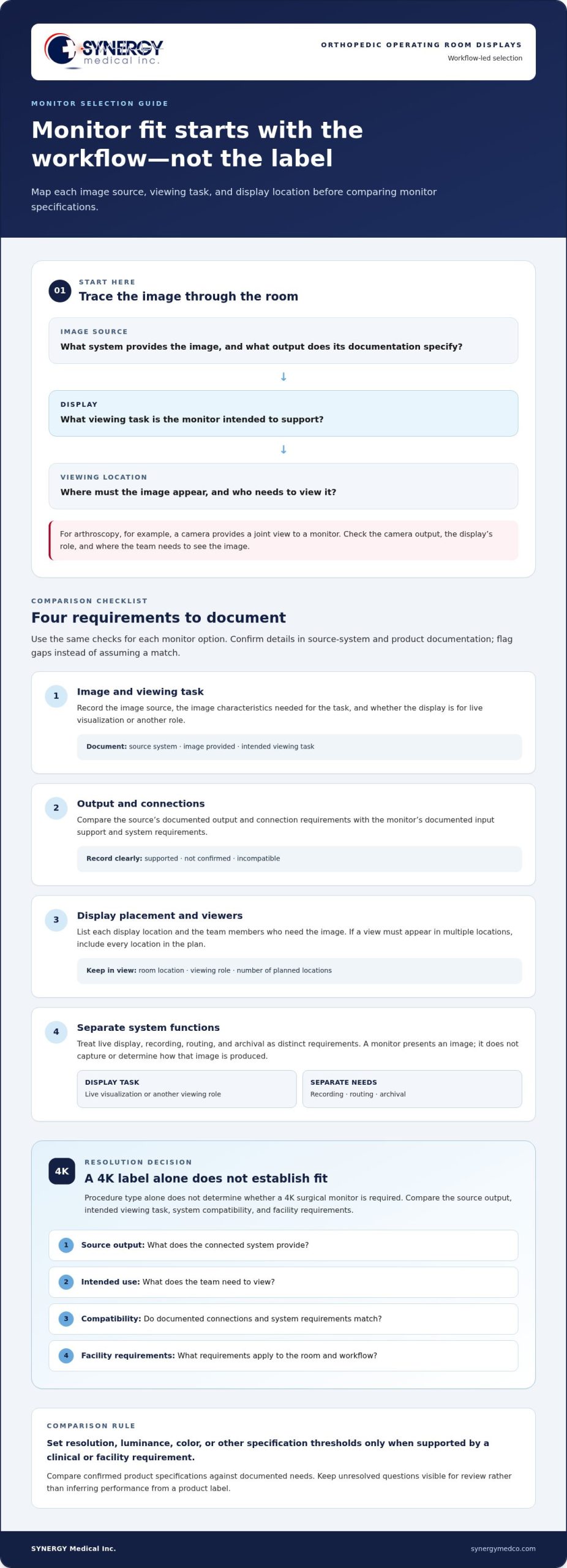
The highest-resolution monitor on a product sheet isn’t automatically the right fit for an orthopedic operating room. Selecting monitors for orthopedic surgery procedures starts with the team’s image workflow: what needs to be viewed, where each image comes from, and how it reaches the display.
Orthopedic teams may work with live video from a surgical camera as well as images from other systems. The right display depends on the intended viewing task and the source system’s documented output, not just a product label or resolution claim.
This guide offers a practical way to map image sources and viewing locations to monitor requirements, compare options against documented specifications, and prepare for a purchasing discussion. Synergy Medical Inc. supplies Surgical Monitors, Radiology Monitors, 4K Surgical Monitors, and Operating Room Video Integration. Its project consult and design assistance can help teams evaluate monitor options and connected video workflows against their requirements.
Key Takeaways
- Assess monitors for orthopedic surgery procedures by matching display needs to the images, viewing tasks, and locations in each workflow.
- Document image characteristics and supported connections using the source system’s materials before comparing monitors.
- Decide whether 4K fits by considering source output, intended viewing tasks, system compatibility, and facility requirements, not procedure type alone.
- Use documented requirements to compare surgical monitor options and plan a project consultation with SYNERGY Medical.
How monitors support orthopedic surgery procedures
A surgical monitor presents images or video from a connected source. It does not capture the image or determine how it is produced. Cameras, video recorders, and integration equipment perform separate functions, though they may be part of the same operating-room workflow.
For monitors for orthopedic surgery procedures, start by identifying the images clinicians need to view, their source systems, and where the display will be used. For example, arthroscopy uses a camera to provide a view of the joint on a monitor. That workflow makes the camera’s output, the display’s role, and the location where the team needs to see the image relevant to selection.
Start with the workflow, then match the monitor to its requirements.
Where displays fit in an orthopedic operating-room workflow
Trace each image from its source to the display. For every source, record the output and connection requirements listed in its documentation, the display location, and the team members who need to view it. Note whether the image is for live visualization or another task. If a view must appear at multiple locations, include each location in the plan.
This mapping helps separate monitor needs from camera, recording, or routing needs. SYNERGY Medical supplies surgical monitors and Operating Room Video Integration for connected video workflows. Document the requirements for each component separately so the display comparison stays focused.
Why procedure context matters
Procedure type alone does not define the display requirements. A resolution label or broad product description cannot establish fit without the source image, viewing task, display location, and system requirements. Compare those needs against product documentation rather than assuming one display category suits every orthopedic workflow.
This guide covers display selection and purchasing considerations, not clinical treatment decisions. The clinical team identifies the images needed for its work. Procurement and technical teams can then translate those needs into display and connection requirements.
Which requirements should teams assess in orthopedic surgery monitors?
A useful comparison begins with the monitor’s intended role, not assumptions based on its category or headline specification. Record the clinical viewing task, image source, display location, and system documentation that defines output and connection requirements. Use the same criteria for every option so the comparison reveals confirmed matches and unresolved needs.
Focus on viewing tasks, image characteristics, source outputs, supported connections, display roles, and room workflow.
Document image sources and display roles
List each source and the image it provides. Use the source system’s documentation to record its output and connection requirements, then note where the image needs to appear and who needs to view it. Describe whether the display is intended for live visualization or another role.
Keep related functions distinct. Live viewing is a display task; recording, routing, and archival are separate system requirements. If the workflow includes these functions, document them separately rather than treating them as monitor specifications.
Match documented requirements to monitor options
Build the comparison from specifications confirmed in product documentation. For each option, check the source output, supported connections, intended viewing task, and display location. Record any gap or incompatibility instead of inferring performance from labels such as “surgical” or “high resolution.” Set thresholds for resolution, luminance, color, or other specifications only when they are supported by a clinical or facility requirement.
SYNERGY Medical’s surgical monitor options give teams a product category to evaluate against those criteria. A consistent comparison can separate confirmed specifications from requirements that still need review.
- Image: Record the source, its output, and the image characteristics needed for the viewing task.
- Connection: Check documented input support and system compatibility.
- Placement: Identify the display location and its role in the room.
- System function: List separate needs for live display, recording, routing, or archival.
Use the completed comparison alongside SYNERGY Medical’s monitor information to keep product review tied to documented criteria.
Does every orthopedic procedure need a dedicated 4K surgical monitor?
No. Procedure type alone does not establish whether a 4K display is required. Compare the monitor with the source system’s output, the team’s viewing task, system compatibility, and facility requirements. A 4K label by itself does not show whether a display fits a particular workflow.
SYNERGY Medical offers 4K Surgical Monitors for operating rooms, surgical centers, and clinics. Consider this category alongside other surgical monitor options, and base the decision on documented requirements and product specifications rather than assumptions about clinical benefit.
Compare 4K and other surgical monitor options by use case
Use the following checks to compare options. Fill them in using the source-system and monitor documentation, and flag any missing information for review.
- Source output: Record what the connected system provides and compare it with the monitor’s documented support.
- Intended use: Define what the team needs to view and assess the listed display specifications against that task.
- Compatibility: Match documented connections and system requirements, noting unresolved questions.
- Facility requirements: Record applicable room and workflow requirements and compare each option against them.
This approach helps teams assess 4K and other surgical monitor options without assuming one resolution or category suits every procedure.
Account for video integration in the decision
If images from multiple connected systems need to reach a display, include source routing in the workflow review. Routing and signal management are system-level considerations, distinct from monitor specifications. Include Operating Room Video Integration as a related part of the plan, and assess its requirements separately from the display.
Keep the 4K decision tied to source output, viewing task, and system requirements documented for the workflow.
How to evaluate monitors for orthopedic surgery with SYNERGY Medical
A documented sequence turns clinical and technical needs into a focused product review. It keeps the evaluation of monitors for orthopedic surgery procedures grounded in facility requirements.
- Define workflows. Identify procedure-related viewing tasks and where images need to be visible.
- Document system requirements. Record image sources, supported outputs and connections, display locations, and separate routing or recording needs.
- Compare documented products. Match published specifications to requirements and note unresolved compatibility questions.
- Plan the discussion. Use the requirements brief to guide review with clinical, engineering, and procurement stakeholders.
Prepare a concise monitor requirements brief
List the relevant workflows, intended display locations, image sources, and connection needs from system documentation. For each display, note who will use it and the task it supports. Clinical stakeholders can describe viewing needs, engineering staff can review system requirements, and procurement staff can coordinate the comparison.
Move from evaluation to a product discussion
Use the brief to assess options in the surgical monitor category against facility requirements. SYNERGY Medical’s project consult and design assistance can support the review of intended use, documented specifications, and connected operating-room video workflows. Keep any unresolved compatibility questions visible in the discussion instead of assuming a model is suitable before reviewing its documentation.
Bring the requirements brief to your product discussion with SYNERGY Medical.
Move Forward With a Clear Evaluation Record
Keep one current record of requirements, product documentation, and unresolved compatibility questions throughout the purchasing review. Assign an owner so clinical, technical, and procurement stakeholders can work from the same criteria and update the record as facility needs evolve.
A clear record gives your team a consistent basis for comparing monitors for orthopedic surgery procedures. It keeps the decision focused on fit for the intended workflow and highlights questions to resolve before selection.
Contact SYNERGY Medical to discuss your monitor requirements and project needs.
Frequently Asked Questions
Can one surgical monitor display images from multiple sources?
It depends on the documented capabilities of the monitor and room video system. If the team plans to view feeds from separate systems, list each source, identify the views needed at each location, and record each source’s documented output. This helps distinguish monitor-input needs from routing needs, or identify where both require review.
Does 4K automatically make a surgical monitor the right choice?
No. Resolution is one part of the product comparison. For monitors for orthopedic surgery procedures, compare the model documentation with source output, planned viewing tasks, and facility requirements. Do not infer input support, image handling, or other functions from a 4K label. Separate verified specifications from items that need system-level review.
Are surgical monitors and radiology monitors interchangeable?
Not based on category names alone. Viewing procedure-related video in an operating room differs from reviewing diagnostic images. Define the intended use, then assess the system and facility requirements for that task. If a project includes both procedure-room viewing and diagnostic image review, document them as separate display needs rather than assuming one monitor category serves both.
What should a facility document before comparing orthopedic surgery monitors?
Create a shared record of each display role, source system, viewing task, and documented connection requirement. Add relevant model or system-document references and assign an owner to resolve open compatibility questions. Include clinical, engineering, and procurement stakeholders to capture use needs, technical constraints, and purchasing criteria without relying on assumptions.
Can a surgical monitor replace a medical video integration system?
No. A monitor presents an image, while a video integration system handles video connections or routing across a room. A project adding a display may require monitor selection alone, while a room with several sources may also need system-level planning. Treat these as related but distinct requirements, and assess each against its own documentation.
About author
