
No products in the cart.
Return To Shop


Pathology display monitor requirements for diagnostic labs
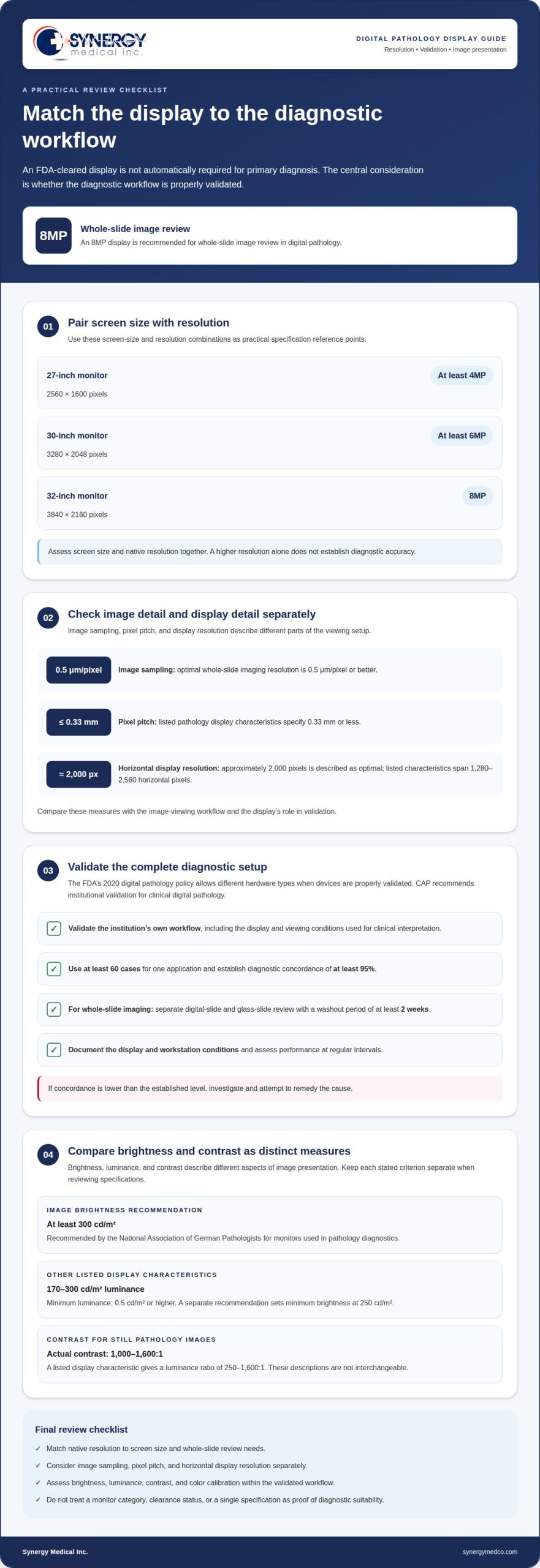
An FDA-cleared display is not automatically required for primary diagnosis. The FDA’s 2020 digital pathology policy allows different hardware types when devices are properly validated, so pathology display monitor requirements center on whether the diagnostic workflow is validated, not simply on a clearance label. Resolution and brightness still matter: an 8MP display is recommended for whole-slide image review.
Before choosing a monitor for clinical use, it makes sense to look for a clear regulatory answer. But the display is only one part of the decision. Image quality, color calibration, and performance within the validated workflow also determine whether it suits diagnostic review.
This article explains when an FDA-cleared display may be needed, which brightness and resolution factors to consider, and how validation and routine quality control fit into digital pathology. It also covers practical selection criteria to help you compare monitor specifications with your lab’s diagnostic workflow.
Key Takeaways
- FDA clearance alone does not determine whether a display suits primary diagnosis; validation of the diagnostic workflow is central.
- Match monitor resolution to screen size and image-review needs, with higher pixel counts supporting detailed whole-slide viewing.
- Assess brightness alongside contrast and color calibration to support consistent viewing of pathology images.
- Use screen size, viewing distance, and routine performance checks together when selecting and maintaining a digital pathology display.
Display resolution for whole slide imaging
Whole-slide image review depends on matching display resolution to image detail and screen size. An 8MP display is recommended for whole-slide image review in digital pathology.
Resolution and Detail Visibility
More display pixels can make fine structures easier to distinguish, provided the image source contains that detail. For whole-slide imaging, optimal image resolution is 0.5 μm/pixel or better. This describes image sampling, not monitor pixel count. A display’s pixel pitch is a separate measure; listed pathology display characteristics specify 0.33 mm or less. Consider both measures when assessing whether a screen can show the image detail needed for diagnostic review.
A horizontal display resolution of approximately 2,000 pixels is described as optimal, while listed characteristics span 1,280-2,560 horizontal pixels. These values describe display specifications, not a universal diagnostic threshold. The appropriate choice also depends on the image-viewing workflow and the display’s role in validation. A higher resolution alone does not establish diagnostic accuracy.
Resolution by Screen Size
Screen size and resolution should be assessed together: a larger panel needs enough pixels to preserve useful detail across its viewing area. Recommendations pair a 27-inch monitor with at least 4MP, or 2560 × 1600 pixels; a 30-inch monitor with at least 6MP, or 3280 × 2048 pixels; and a 32-inch monitor with 8MP, or 3840 × 2160 pixels. These combinations offer a practical comparison when reviewing specifications.
For example, an 8MP display suits whole-slide review, while a 27-inch screen has a stated minimum of 4MP. Compare the display’s native resolution with the screen size, rather than relying on diagonal measurement alone. Keep the validation setup consistent with the monitor configuration used for diagnostic review. This links screen resolution to the actual visual task, rather than treating a pixel count as proof of accuracy.
- Image detail: assess image sampling at 0.5 μm/pixel or better.
- Display detail: compare horizontal resolution and pixel pitch.
- Screen size: use the 27-inch, 30-inch, and 32-inch resolution pairings as reference points.
Do I need an FDA-cleared display for primary diagnosis?
An FDA-cleared display is not automatically required for primary diagnosis. The FDA’s 2020 digital pathology policy allows different hardware types when the diagnostic system is properly validated.
Medical-Grade and Consumer Displays
Medical-grade, professional-grade, and consumer monitors differ in intended use and display controls. Medical-grade models often support DICOM Part 14 and calibration features for medical imaging. A consumer monitor’s category alone does not establish whether it suits diagnostic review. Assess the display as part of the workstation, including how it presents pathology images under the conditions used for clinical interpretation.
Warranty duration describes product coverage, not image performance or diagnostic suitability.
Diagnostic Monitor Specifications
For primary digital pathology diagnosis in the United States, assess resolution, color calibration, contrast, and image reproduction within the intended workflow. The available policy does not establish one universal monitor specification or require an FDA-cleared display for every validated setup. Choose a display based on the diagnostic tasks and system the lab will validate.
Evaluate specifications together. A monitor’s stated contrast and color controls, for example, describe different aspects of image presentation. Neither one alone shows whether the complete workstation performs appropriately for clinical review.
Display Validation Steps
Before primary use, the institution should validate its own digital pathology workflow, including the display and viewing conditions. CAP recommends institutional validation for clinical digital pathology. A typical validation uses at least 60 cases for one application and establishes diagnostic concordance of at least 95%. Lower concordance requires investigation and an attempt to remedy the cause.
For whole-slide imaging validation, separate digital-slide and glass-slide review with a washout period of at least 2 weeks. Document the display and workstation conditions, then assess performance at regular intervals. This evaluates the diagnostic setup in practice, rather than relying on monitor category or clearance status alone.
Recommended diagnostic brightness
Brightness describes a display’s light output, while luminance expresses light output per unit area. For pathology images, assess brightness alongside contrast and uniformity.
Brightness and Luminance
The National Association of German Pathologists recommends at least 300 cd/m2 image brightness for monitors used in pathology diagnostics. Other listed pathology display characteristics specify luminance of 170-300 cd/m2, with minimum luminance of 0.5 cd/m2 or higher. A separate recommendation sets minimum brightness at 250 cd/m². These figures describe related but distinct measures and recommendations, so compare each with the display’s stated performance.
For example, a device rated at 250 cd/m² meets the stated minimum brightness recommendation, but not the German association’s 300 cd/m2 recommendation. Keep units and criteria distinct when reviewing specifications for diagnostic imaging.
Brightness and Contrast
Brightness affects how clearly a display presents light and dark regions, while contrast describes the difference between those regions. For still pathology images, actual contrast should be 1,000-1,600:1. A listed display characteristic gives a luminance ratio of 250-1,600:1. These ranges use different descriptions, so avoid treating them as interchangeable specifications.
Compare a monitor’s brightness and contrast figures together. A high brightness value alone does not show how clearly subtle tissue features appear against surrounding areas. Review the image settings used for diagnosis, since changing brightness can affect visual contrast across pathology images.
Brightness Uniformity
Uniformity describes how consistently brightness is distributed across the screen. Uneven output can make the same tissue image appear lighter in one area and darker in another. Assess the full viewing area rather than relying on a single center measurement, and include uniformity in monitor validation and regular performance checks.
Record the conditions for each assessment, including the selected brightness setting, so changes in display output are easier to identify over time. If one screen region appears visibly dimmer during review, evaluate the device before relying on that area for diagnostic interpretation.
What resolution do I need for digital pathology?
A 27 to 32 inch screen is recommended for pathologists’ comfort and efficiency. Calibrate displays and perform quality checks at regular intervals; choose the number of screens according to the structures and images the clinical workflow requires viewing at once.
Screen size should fit the viewing setup, not just the workstation. A pathology display’s diagonal dimension should be about 80% of the viewing distance, and the recommended viewing distance is 20-28 inches. Position the monitor at or slightly below eye level. These measures help establish a consistent visual setup for reviewing digital slides.
Refresh rate also affects day-to-day color consistency. A 60 Hz screen refresh rate is recommended for digital pathology. Telepathology image refresh time is recommended to be 1 second, which describes image refresh time rather than the display’s screen refresh rate. Keep these specifications distinct when assessing a monitor for clinical use.
No single display count suits every whole-slide imaging workflow. A workstation may use one screen for slide review, or additional screens to view separate images or clinical information simultaneously. Choose an arrangement that fits the diagnostic steps and material viewed together, then include that configuration in workflow validation.
- Screen size: assess 27 to 32 inches alongside viewing distance.
- Position: set the monitor at or slightly below eye level.
- Refresh: consider 60 Hz for day-to-day color consistency.
- Quality control: calibrate and assess display performance at regular intervals.
Use these workstation and display criteria when planning your diagnostic monitor selection.
Synergy Medical Inc.
Synergy Medical Inc. supplies monitors for diagnostic imaging environments, including medical-grade monitors, Radiology Monitors, Mammography monitors, and Surgical Monitors. These categories can inform equipment selection for pathology workstations, while the lab’s resolution, brightness, calibration, and validation criteria guide the decision.
Turn to Synergy Medical Inc. when selecting monitors for diagnostic imaging or considering displays for a clinical workspace. Share the intended imaging use and relevant workstation requirements to focus the discussion on suitable monitor categories.
Contact Synergy Medical Inc. to discuss monitor options for your lab.
Set a Clear Direction for Your Lab
Use the display criteria in a written specification for the diagnostic workflow. Before procurement, define the clinical tasks, slide types, workstation arrangement, and image-viewing conditions the monitor must support. This gives the lab a practical basis for comparing candidate displays with their intended use, rather than treating one feature as the whole decision.
These pathology display monitor requirements belong in the lab’s broader digital pathology plan. A clear brief connects display selection with workflow design, validation, and ongoing quality control. It also gives procurement and clinical teams a shared reference as they assess options.
Synergy Medical Inc. supplies medical monitor categories for clinical environments, including Surgical Monitors, Radiology Monitors, and Mammography monitors. Use the lab’s documented imaging needs to guide the discussion and identify the appropriate display category.
Contact Synergy Medical Inc. about pathology displays
A well-defined display plan gives your team a stronger starting point for its next procurement decision.
Frequently Asked Questions
Why does sRGB matter for pathology?
sRGB is a standardized color space that helps compatible displays represent colors consistently. In pathology, consistent color presentation can help maintain a comparable view of stained tissue images across a workstation. However, sRGB alone does not establish diagnostic color accuracy. Assess the monitor’s color calibration and the complete image workflow, especially when color differences could affect how a stain is interpreted.
What spatial resolution and pixel density are recommended for whole-slide image diagnosis?
For whole-slide image diagnosis, image resolution of 0.5 μm/pixel or better is recommended. This describes the digitized slide, not monitor pixel density. Listed display characteristics include pixel pitch of 0.33 mm or less, with approximately 2,000 horizontal pixels described as optimal. When documenting pathology display monitor requirements, distinguish image sampling from the monitor’s own resolution and pixel pitch.
What luminance, contrast ratio, and grayscale requirements apply to pathology display monitors?
Brightness recommendations include at least 250 cd/m², while the National Association of German Pathologists recommends at least 300 cd/m2 for pathology diagnostics. Still-image contrast is described as 1,000-1,600:1. Separately, a 13-bit look-up table is specified for color gradation, not as a grayscale requirement. Assess these measures independently when comparing monitor specifications for diagnostic image review.
Are there FDA or CAP requirements for monitors used in digital pathology?
The FDA’s 2020 digital pathology policy allows different hardware types when the system is properly validated; display clearance alone is not a universal prerequisite. CAP recommends that institutions using digital pathology for clinical diagnosis validate their own workflow. Include representative cases and diagnostic concordance in the validation plan, then investigate results that fall below the stated concordance target.
What standards govern color accuracy and calibration for pathology displays?
DICOM Part 14 is associated with consistent medical-image reproduction, and medical-grade pathology displays often adhere to it. Calibration addresses how the display reproduces color and luminance under the lab’s viewing conditions. For documented pathology display monitor requirements, record the calibration approach and display settings used during validation, then repeat performance assessments at regular intervals to detect changes.
What are the differences between medical-grade and consumer monitors for pathology?
Medical-grade monitors are intended for medical imaging workflows and often include DICOM Part 14 support and calibration features. Consumer monitors can display the same image files, but their controls and intended use may differ. For example, assess color behavior, contrast, and stability within the diagnostic workflow rather than assuming a monitor category alone establishes suitability for primary review.
About author
