
No products in the cart.
Return To Shop


Resolution and Image Sharing for Remote Surgical Consultation
A sharp image alone does not make a display suitable for remote surgical consultation. A medical display for remote surgical consultation must present surgical video clearly and keep the image aligned with the procedure. Surgical monitors are medical-grade displays designed for operating-room use, where both resolution and signal timing matter.
Resolution is a reasonable place to start: fine detail can help remote colleagues assess the view. But the display is only one part of the image-sharing chain, and even a brief delay can feel disorienting during surgical telementoring. This article explains what surgical monitors are, how medical-grade and consumer displays differ, and how resolution, signal integration, and latency affect remote viewing.
You’ll also see why 4K resolution, which provides four times the resolution of Full HD, can matter when detail is critical, and what to consider when images move between the operating room and remote participants. The goal is a clearer understanding of the display’s role in a connected surgical workflow.
Key Takeaways
- Trace the full video path, since capture, signal conversion, transmission, and display processing can each affect how remote viewers see the procedure.
- Assess color gamut, contrast, luminance, and image clarity together to determine whether the display presents useful visual detail.
- Match screen resolution to the source image and viewing task; higher resolution is most useful when the source and workflow can support it.
- Compare medical-grade and consumer displays by their intended clinical use and image-handling needs, not by resolution alone.
Low-latency surgical video and image sharing
Remote consultation depends on a complete path from the operating-room camera to the display and remote participants. Even a brief delay can be disorienting during surgical telementoring.
Surgical Video and Image Sharing
Low-latency sharing sends surgical video and images to remote clinicians with minimal delay. During image-guided surgery, the display should show the scene in sync with what is happening in the operating room. This timing helps a remote specialist interpret the patient’s anatomy and follow changes as they occur. A frozen or delayed image can make movement appear out of sync.
Telehealth video conferencing equipment provides the communication channel for group meetings among doctors. For example, a surgeon can share a live camera view while consulting clinicians discuss the same image. Video-over-IP systems carry video across a network, while PTZ cameras let a remote operator adjust the camera’s pan, tilt, and zoom. Each component must work with the display and conferencing system.
Video Integration and Signal Conversion
Video integration brings signals from operating-room sources into a shared display and consultation workflow. Signal conversion changes a source signal into a format the next device can receive. The camera, video integration system, and display must therefore handle compatible signals from capture through viewing. This setup can bring surgical video and other clinical images into one workflow instead of leaving each source isolated.
When several sources feed a consultation, the integration system routes the selected view to the appropriate screen or meeting. For example, the team can share the surgical camera feed with remote participants while keeping other images available in the operating room. Conversion and routing choices affect which image reaches each viewer and whether the signal path introduces delay.
Setting Up Remote Consultation Displays
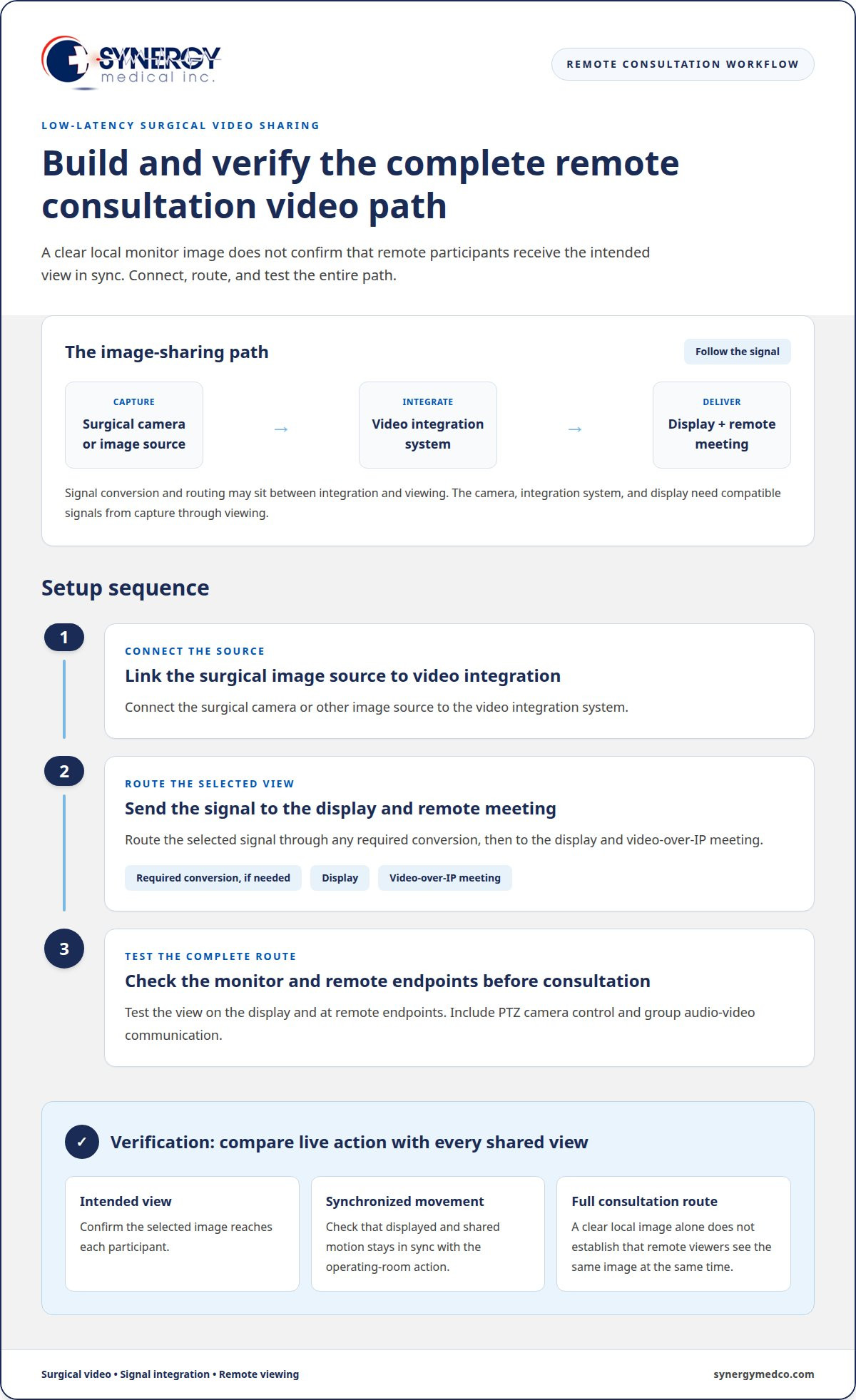
Setup involves connecting the surgical image source, signal path, display, and conferencing equipment, then testing the complete route before consultation. This matters because a clear local image does not prove that remote participants receive the same view at the same time.
- Connect the surgical camera or image source to the video integration system.
- Route the selected signal through any required conversion and to the display and video-over-IP meeting.
- Test the view on the display and at remote endpoints, including PTZ camera control and group audio-video communication.
During testing, compare the live surgical action with the displayed and shared images. Confirm that the intended view reaches each participant and that movement remains synchronized. This checks the complete consultation path, not just the monitor.
What are surgical monitors?
For remote consultation, prioritize accurate color, clear contrast, suitable luminance, and detail that remains visible across the clinical image. A medical-grade monitor should also handle DICOM images consistently, so remote clinicians can interpret the same visual information.
Color, Contrast, and Image Clarity
Color gamut, contrast, and luminance describe the range and visibility of colors and image detail on a monitor. Together, they affect how clearly clinicians can distinguish structures in a surgical view. Low contrast, for example, can make adjacent areas appear similar, while unsuitable luminance can obscure shadow detail. An appropriate color gamut supports visible distinctions without making color alone seem more informative than the source image allows.
Color Accuracy and Bit Depth
Color accuracy means that displayed colors represent the image signal faithfully; bit depth affects how finely tones can be rendered. Medical displays commonly use 10-bit to 14-bit lookup tables, compared with 256 shades of gray on a standard 8-bit consumer monitor. Higher-bit-depth tables can provide up to 16,384 shades of gray, supporting smoother transitions in grayscale images. DICOM Part 3.14 GSDF provides a standard for predictable grayscale display in medical imaging.
For color medical monitors, assess color reproduction alongside grayscale performance. A monitor used to share endoscopic images, for example, needs to preserve visible color distinctions and retain detail in darker regions. Color accuracy depends on both the display and the source signal, so evaluate the complete imaging path rather than judging the monitor in isolation.
Features of Remote Consultation Displays
A remote consultation display should present the intended source clearly and preserve useful grayscale and color distinctions. Match the monitor to the image type, resolution, and signal path used in the clinical workflow. For DICOM X-ray images, an integrated lookup table can support accurate viewing and help prevent dark areas from appearing over-bright. This matters when a remote specialist relies on the shared image to discuss findings.
Reviewing medical-grade surgical monitors by intended use, image handling, and signal compatibility helps teams compare the features relevant to their consultation workflow.
Medical display resolution and 4K imaging
Resolution describes the pixel detail available for viewing surgical imaging, but the source signal must support the display’s capabilities. For a medical display for remote surgical consultation, choose a resolution that fits the images and viewing task. Calibrate the monitor for its clinical workflow, then maintain and clean it according to the manufacturer’s instructions.
Display Resolutions and Pixel Counts
Display resolution is the number of pixels arranged across a screen’s width and height. A Full HD display with 1920 x 1080 pixels has more than two million picture elements. Each pixel contributes to the rendered image, so pixel count affects how finely a display can represent details within its viewing area.
For remote consultation, compare the resolution of the camera or imaging source with the monitor’s native resolution. If a signal contains less detail than the display can show, a higher-resolution screen cannot restore information missing from the source. Matching these components helps teams assess whether the displayed image preserves the detail needed for a particular procedure.
Full HD and 4K Imaging
Full HD and 4K describe different levels of image resolution, with 4K providing four times the resolution of Full HD. This increase can make fine structures easier to distinguish when both the source and viewing workflow carry 4K imaging. For a medical display for remote surgical consultation, the practical benefit depends on the images used, the display, and how clinicians view the screen.
Medical-grade displays can render 4K and 8K video feeds for telementoring. That capability supports high-resolution viewing, but the entire signal path must preserve the source detail. For example, a 4K camera feed routed through a system that outputs only Full HD will reach the monitor at the lower resolution. Confirming source, processing, and display capabilities together helps prevent resolution loss.
Calibration supports consistent image presentation, while routine maintenance helps keep the display usable in clinical settings. Follow the monitor manufacturer’s calibration process and cleaning guidance. Do not assume every panel tolerates the same cleaning agents or methods. A repeatable process helps teams maintain the intended viewing conditions without adopting unsupported cleaning practices.
Consumer versus medical-grade displays
A consumer monitor may display a clear image, but resolution alone does not establish that it is suitable for clinical work. For remote surgical consultation, compare the intended operating-room use, image source, software, and signal path. A screen used for general video meetings has different demands from one showing live surgical images or radiology content.
Medical-grade displays are designed for clinical imaging workflows. Depending on the model, features can include backlight stabilization to help maintain brightness over time. Some surgical monitors also provide automated failover, which switches to a backup signal after a technical failure. These capabilities address continuity and display consistency, not simply pixel count.
Consumer displays can suit general conferencing when the screen shows participant video rather than clinical images. The decision changes when clinicians rely on the display to interpret anatomy, compare image sources, or follow a procedure. Assess the complete workflow: source device, connection, image software, operating-room environment, and the task viewers must perform. A medical-grade label alone does not replace this assessment.
For FDA-related review in the United States, distinguish the display from the complete imaging system and its stated intended use. Resolution or the phrase “medical-grade” alone does not establish a device’s regulatory status. Match the display’s intended clinical role with its documentation and the system in which it operates.
Remote consultation also creates privacy risks if identifiable patient images or meeting information are exposed. Examples include an unattended screen in a shared room, an unauthorized participant joining a meeting, or a recording saved in an uncontrolled location. Use approved conferencing software, restrict access to intended participants, and manage recordings and displayed patient information under facility privacy procedures.
The practical takeaway is to select by clinical task, signal compatibility, and workflow controls, not screen sharpness alone. A consumer screen may serve routine conferencing; a medical-grade monitor is more relevant when clinical images guide discussion or operating-room decisions.
Synergy Medical Inc.: Surgical Monitors
Synergy Medical Inc. offers surgical monitors for facilities assessing displays for operating-room imaging and remote consultation. Match the monitor to the image sources, resolution, and signal workflow, so teams can evaluate their needs in context rather than by resolution alone.
Synergy Medical Inc. also offers Radiology Monitors and mammography monitors for distinct imaging workflows, as well as exam lights for clinical environments. These products serve different purposes: a display intended for radiology review is not automatically the right fit for live surgical video. Identify the primary image source and viewing task first, then compare suitable monitor options.
Explore surgical monitor options for your clinical workflow, or contact Synergy Medical Inc. to discuss display requirements.
Align the display with the next clinical decision
Before specifying a display, identify who will view the images, which sources feed the workflow, and what decisions the shared view must support. This helps teams define requirements for a medical display for remote surgical consultation based on actual clinical use, rather than resolution alone. Involve the operating-room and remote participants who will use the setup, so image presentation and connectivity needs are considered together.
Synergy Medical Inc. offers Surgical Monitors for operating-room viewing, Radiology Monitors for radiology workflows, and mammography monitors for mammography imaging. Matching the display category to its intended clinical task is a practical starting point for evaluation.
Explore Synergy Medical’s available options and identify a display path that fits your consultation workflow.
A considered selection can help your team clarify its clinical imaging needs and move forward with confidence.
Frequently Asked Questions
What is a surgical display?
A surgical display is a monitor used to present clinical images during operating-room workflows. It is separate from the conferencing endpoint, which manages the remote meeting. For example, the monitor may show a live surgical image while a computer handles participant video and meeting controls. Treating these as distinct roles helps teams plan screen placement and avoid obscuring the clinical view with meeting windows.
Why not consumer screens?
A consumer screen may have settings that conflict with a clinical viewing workflow. Check whether picture presets, automatic brightness changes, or sleep settings alter the image or interrupt viewing. These behaviors vary by model, so review the monitor’s specific controls. A facility can also define which screen is used for clinical review and which is reserved for participant video or administrative content.
What resolution, screen size, brightness, and color accuracy are recommended for surgical displays?
There is no single recommended combination for every surgical display. Evaluate a representative image at the intended viewing distance, with the room lighting and screen position used during consultation. Confirm that annotations, fine structures, and color differences remain visible to the intended viewers. This practical assessment helps teams compare displays against their actual workflow without relying on one specification in isolation.
Are medical-grade displays required or recommended for remote surgical consultation?
Requirements depend on the display’s role, its labeling, and the facility’s policies. For procurement, review the product documentation and the intended use of the complete imaging system, not only the monitor. The facility’s compliance team can assess how that use fits its procedures. A display used only for meeting participants serves a different function from one used to review clinical images.
How do medical-grade displays compare with standard monitors for remote surgical consultation?
Compare the available controls with the facility’s review process. For instance, document the selected image mode and brightness settings, then determine whether staff can restore them consistently after switching inputs. A standard monitor can serve as a separate meeting or administrative screen, while the clinical review screen follows the facility’s established image-viewing process.
What video conferencing and imaging connections should a surgical consultation display support?
Start with the connection requirements for the actual camera, computer, and conferencing platform. Confirm that the platform can present the intended image source while keeping meeting controls and participant audio accessible. For example, a team may need to share a surgical image while viewing participants separately. Testing the meeting software with the facility’s chosen devices can reveal workflow conflicts before a consultation.
About author
