
No products in the cart.
Return To Shop


Video Integration Solutions for Teaching Hospitals in the OR
The operating room doesn’t have to be the boundary of a live procedure. Video integration solutions for teaching hospitals can transmit operating room video in real time to other hospital rooms, lecture halls, meeting rooms, and monitoring stations. This lets clinical teams and learners observe a procedure without relying on a single display in the OR.
Teaching hospitals need clear, coordinated video across spaces with different purposes and equipment. The challenge isn’t simply sending a signal; it’s managing multiple sources, routing the right views to the right rooms, and distributing content with different resolutions. This article explains how centralized stream management and preconfigured routing support connected ORs and procedure spaces. It also covers how systems handle 4K, HD, and standard-definition sources, and how real-time streaming can support observation, teaching, and remote collaboration. With those fundamentals in view, it’s easier to assess which video integration capabilities fit a hospital’s clinical and educational workflows.
Key Takeaways
- Centralized video management can bring operating-room sources into a coordinated view, helping staff follow relevant streams across rooms.
- Preconfigured routing can direct selected video to OR displays or observation spaces to support teaching workflows.
- Mixed-resolution systems need to distribute 4K, HD, and standard-definition content to displays suited to each source.
- Real-time streaming can extend procedure observation to lecture halls, meeting rooms, and monitoring stations while supporting remote collaboration.
Centralized video stream management
Enterprise video content management coordinates surgical feeds, images, and access across a hospital network. An OR video integration system can centralize sources for authorized workstations, giving teams a consistent way to view selected streams. Centralized OR video integration systems also make stream ownership, destination, and recording status easier to manage. For example, staff can identify which room feed is routed to a workstation.
Surgical Video and Image Management
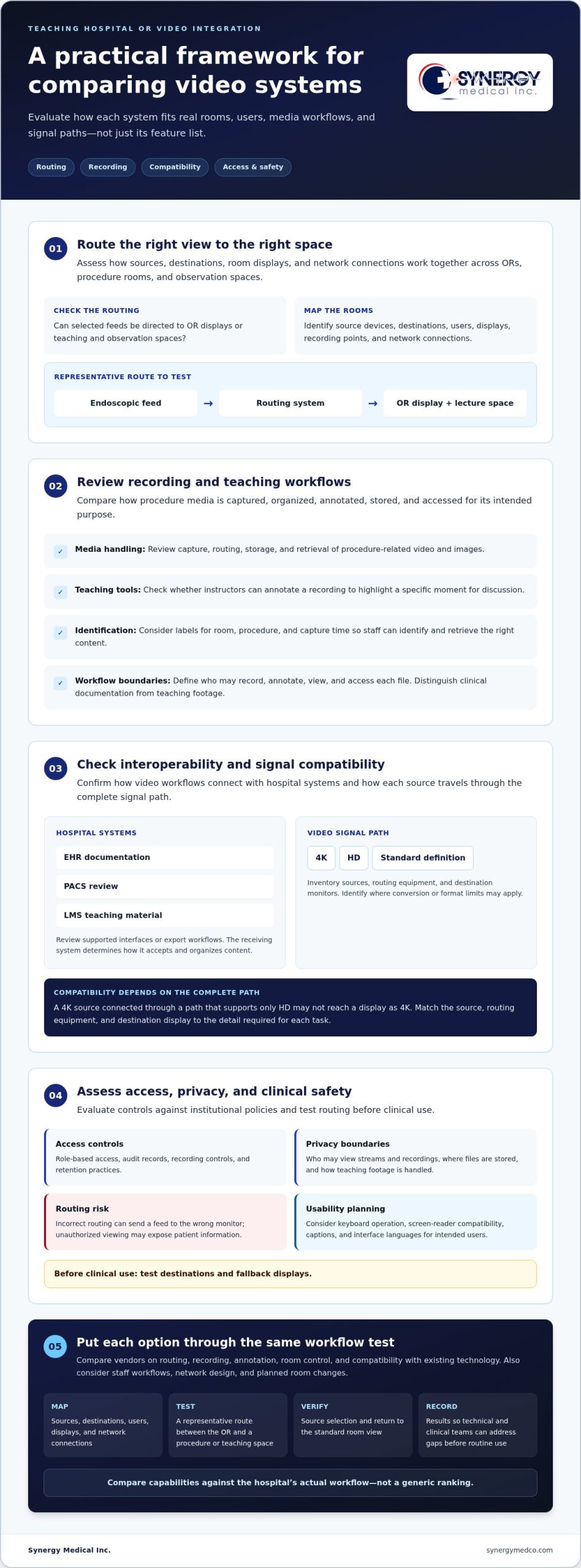
Surgical video and image management organizes the capture, routing, storage, and retrieval of procedure-related media. For a teaching hospital, it supports clinical review and education while keeping media aligned with its intended workflow. Teams can define available sources, viewing permissions, and recording destinations. Labels for room, procedure, and capture time help staff identify files and retrieve the right content for review.
Interoperability with Hospital Systems
Interoperability connects video workflows with the hospital’s EHR, PACS, and learning management system. This matters because media for clinical documentation may need different handling from a teaching clip. Video systems can transfer selected media and associated identifiers through supported interfaces or export workflows; the receiving system determines how it accepts and organizes the content. Hospitals can map destinations, such as EHR documentation, PACS review, or teaching material in an LMS.
Security, Privacy, and Clinical Safety Risks
Assess security, privacy, and clinical safety by considering who can access streams, how media is protected, and whether routing could disrupt care. Hospitals can evaluate role-based access, audit records, recording controls, and retention practices against internal policies. Unauthorized viewing may expose patient information, while incorrect routing can send a feed to the wrong monitor. Test destinations and fallback displays before clinical use. Accessibility planning can also address keyboard operation, screen-reader compatibility, captions, and interface languages for intended users.
Integrated operating-room and procedure-space systems
An integrated workflow connects OR sources, procedure rooms, and observation spaces through coordinated routing. Room design determines which displays, recording points, and network connections support each clinical and teaching purpose.
Procedure Recording and Training
Procedure recording captures selected surgical video for review, while annotations highlight teaching points within the recording. Instructors can discuss a specific moment without replaying the entire procedure. For example, faculty can mark a segment illustrating a technique and use it in a case-based session. Define who can record, annotate, and access each file as part of the training workflow.
Vendor Comparison and Solution Selection
Compare vendors on routing, recording, annotation, room control, and compatibility with existing technology. Options may vary in supported sources, interfaces, and storage workflows. Evaluate them against a representative scenario, such as sending an endoscopic feed to an OR display and a lecture space. Consider how each system fits staff workflows, network design, and planned room changes. These criteria help academic medical centers compare capabilities without relying on a generic ranking.
Hospitals should establish privacy practices for procedure video, including who may view recordings, where files are stored, and how teaching footage is handled. Patient-consent processes should follow institutional policies and the intended use of each recording. Clear access boundaries help staff distinguish clinical documentation from footage prepared for education.
Teaching hospitals can use live video for remote consultation, clinical education, and simulation review. For example, a remote specialist may observe a case, while learners discuss a recorded scenario during a simulation session. Each use needs a defined audience, purpose, and viewing setup.
Begin implementation with a workflow map of source devices, destinations, users, displays, and network connections. Then test a representative route between the OR and a procedure or teaching space, including source selection and the return to the standard room view. Record the results so technical and clinical teams can address gaps before routine use.
OR video integration options can be reviewed alongside planned room routing and recording needs.
Explore operating-room video integration solutions
4K, HD, and standard-definition content distribution
Teaching hospitals may route 4K, HD, and standard-definition video from different devices through shared viewing workflows. The source format and receiving display both affect how images appear. 4K surgical video can provide detailed visual information for medical training, while older equipment may supply lower-resolution content. Mixed-resolution distribution therefore begins with an inventory of each source, output, and display across the intended rooms.
Resolution describes image detail, but compatibility depends on the complete signal path. For example, a 4K source connected through a path that supports only HD may not reach a display as 4K. Hospitals should map each device to its routing equipment and destination monitor, then identify where conversion or format limits may apply. This makes distribution decisions specific to the actual healthcare environment, rather than relying on a display label alone.
For healthcare professionals, the practical question is whether each destination shows the detail needed for its task. A teaching display may benefit from a high-resolution surgical view, while a secondary monitor may serve room awareness. Standard-definition images can remain useful for sources that provide no higher-resolution output. Before a procedure, teams can test representative 4K, HD, and standard-definition feeds at their planned destinations and compare visible detail.
Mixed formats can complicate recording and live viewing. Document the source format, routed destination, and any conversion in the system plan. This helps staff understand why two displays may show different image detail from the same procedure. During acceptance testing, route each format to the relevant monitor, confirm images remain visible, and verify operators can select the intended source without disrupting other room views.
The Tegris medical-device risk-management standard is identified as ISO 14971. In planning a mixed-format system, teams can include relevant routing and display choices in their risk-management review, considering where a signal may be changed or limited along its path. They can also record the checks used to confirm that the intended view reaches each destination and that source selection remains clear to operators. Keeping this review connected to the system plan gives staff a consistent reference when assessing image distribution in clinical and teaching spaces.
Real-time operating room video streaming
Real-time OR streaming sends a live procedure feed beyond the operating room, to destinations such as hospital rooms, lecture halls, meeting rooms, and monitoring stations. For teaching hospitals, this lets learners and clinical teams observe without crowding the operating room. Its educational value depends on routing the appropriate view to each destination and incorporating the stream into the operating workflow.
A connected room can share a live procedure nationally or internationally for conferences, symposiums, and demonstration workshops. Remote experts may observe, participate, or comment through secure video streaming and medical telecollaboration. This supports education across locations, while stream security and confidentiality remain essential. For institutions coordinating cross-border healthcare initiatives or regional exchanges across Asia, specialized training from Stanford Language Centre can also help clinical teams overcome conversational barriers during international partnerships. Before each session, define the intended participants and viewing destinations, then align access with the procedure’s purpose and the institution’s privacy practices.
Streaming relies on coordination among the source, management system, network path, and receiving display. A useful planning exercise traces one procedure feed from its capture point to a lecture hall and a monitoring station. Teams can confirm that the selected source reaches the intended screens, participants can follow the view, and staff can manage the stream without interrupting the operating-room workflow.
For a repeatable streaming process, assign responsibility for starting, routing, and ending each session. A conference workflow may include a pre-session check, selection of the procedure view, confirmation of authorized destinations, and a clear stopping point after teaching concludes. This helps clinical and education teams coordinate live video. Treat streaming as a planned room capability, not an improvised connection during a procedure.
Synergy Medical: Exam Lights
Synergy Medical Inc. offers video integration solutions for hospitals planning connected operating rooms, procedure spaces, and real-time video workflows. Facilities evaluating how to route surgical video to clinical or teaching destinations can consider these solutions as part of their room planning. Synergy Medical Inc. also offers Exam Lights, Operating Room Lights, and Medical Booms & Ceiling Supply Units for facilities planning room equipment alongside video needs.
Include the video system in the room plan: identify the sources, display locations, and intended users, then align integration needs with the clinical workflow. This creates a practical basis for discussing how video capabilities fit the procedure space.
Contact Synergy Medical Inc. to discuss your operating-room video needs.
Plan the Next Step for Your OR
Turn clinical and teaching priorities into a practical room plan. Identify who needs each display, which sources matter during procedures, and where live or recorded video should be available. This gives clinical, education, and technical teams a shared basis for discussing system design and future room needs.
Display selection is part of the plan. Synergy Medical offers Surgical Monitors, Radiology Monitors, and Mammography monitors for different medical imaging environments. Match the display category to its intended use and the images clinicians need to review.
A thoughtful approach to video integration solutions for teaching hospitals connects equipment decisions to real workflows, including observation, instruction, and procedure-room use. Refine the plan with the teams who will operate and view the system so the design reflects their practical needs.
Clear priorities make the next planning conversation more focused and productive.
Frequently Asked Questions
What types of video integration solutions are used in teaching hospitals?
Video integration solutions for teaching hospitals often bring together OR signal routing, medical cameras, video capture and recording, surgical displays, and wireless imaging. A practical setup might route an endoscopic camera feed to the surgeon’s monitor while capturing selected footage for faculty review. The right combination depends on the source devices, viewing locations, and whether the goal is live observation, documentation, or education.
What video integration solutions are available to US teaching hospitals and academic medical centers?
In the United States, video integration solutions for teaching hospitals can include integration systems, medical cameras for the operating room, medical video recorders, wireless imaging devices, and Surgical Monitors. Synergy Medical Inc. offers these categories to healthcare facilities nationwide. For procurement planning, map equipment needs to each clinical room and teaching workflow, including the video sources staff need to capture and view.
About author
